Most personal knowledge systems rot. You start a vault with good intentions, capture a few hundred notes, and then the upkeep quietly becomes a second job. Files pile up with vague names. Half-finished thoughts never get reviewed. The folder you meant to organize stays messy because organizing it by hand is tedious and nobody keeps up. The problem was never the note-taking. It was the maintenance, and maintenance has always been manual work.
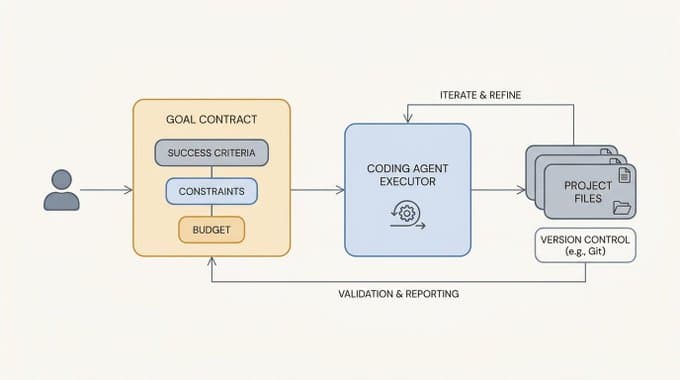
An AI agent that lives in your terminal changes the economics of that work. Instead of you renaming files, restructuring folders, and rewriting messy notes one at a time, you delegate the grind to an agent that can read, edit, and reorganize your vault on command. The result is not just a tidier folder. It is a knowledge operations system that stays useful because keeping it useful is no longer expensive.
That is exactly what this hands-on lab teaches you to build. It is the interactive-terminal edition of 30 Days of Hermes Agent. Instead of a prompt box, you drive a real Hermes Agent session in a live terminal, exactly like using Hermes Agent on your own machine. Over 30 short lessons, you turn one messy Personal Knowledge Vault into a useful knowledge operations system with readable notes, searchable project context, reusable templates, review workflows, task tracking and more.
Why a real terminal, not a prompt box
Plenty of tutorials wrap an agent in a friendly chat box and call it a day. This lab does the opposite. There is no prompt box. You type into a real terminal running a real Hermes Agent session, the same way you would on your own laptop.
That choice is deliberate. A chat box teaches you how to use one specific product. The terminal teaches you a skill that transfers everywhere. When you ask the agent to read a file, propose an edit, and apply it, you are learning the actual rhythm of working with an AI agent on a real filesystem. You see the commands, the responses, and the changes land in front of you.
By the end you have built muscle memory, not just watched a demo. You know how to start a session, point the agent at your files, review what it wants to change, and accept or reject it. That muscle memory carries straight over to your own machine and your own vault. The lab is a safe place to practice the exact moves you will use for real.
What you build over 30 days
The course is 30 short, hands-on lessons that build from your very first conversation to a full knowledge operations system. Each one is small and focused, so you make steady progress without ever feeling stuck.
The early arc gets you fluent with the basics. In "Your First Conversation" you simply talk to the agent and see how it responds. "Your First Edit" has you make a real change to a file and confirm it landed. From there you learn to be precise. "Be Specific" shows why a clear request beats a vague one, and "Reference Files with @" teaches you to point the agent directly at the files you mean using the @ syntax, so it works on the right thing instead of guessing.
Next you start building reusable structure. "Make a Reusable Template" turns a one-off note format into something you can apply again and again. "Organize a Messy Folder" puts the agent to work on the exact problem that kills most vaults, taking a pile of inconsistent files and giving them readable names and a sane structure. Along the way you learn to work safely. "Undo Safely" covers how to back out of a change you do not want, and "Managing the Conversation" keeps a long session focused so the agent stays useful instead of drifting.
The middle lessons widen your toolkit. "Discover What Hermes Agent Can Do" helps you find capabilities you would not have thought to ask for, and "Capstone: Organize Your Vault" pulls the early skills together into a single real cleanup. After that the lessons move from tidying into genuine knowledge operations. You build review workflows so notes actually get revisited instead of rotting. You set up task tracking so open loops live in your vault rather than your head. You write session-restart briefs, like the one in "Write a Restart Brief," so you can pick up complex work later without losing context. And in lessons like "Make a Session Finder" you build small tools that make your accumulated knowledge searchable.
The later lessons keep compounding on that foundation. By the end the messy folder you started with has become a second brain you can search, maintain, and trust, all driven from the terminal by you. The point is not that the agent does everything for you. It is that you have learned to direct it well enough to run a real note-taking system without the maintenance burden that usually sinks one.
What's under the hood
Every lesson runs in a real terminal in your browser, with no install and no API key. The terminal runs Hermes Agent, DAIR's command-line agent, exactly as you would run it on your own machine. You manage a Markdown knowledge vault by talking to the agent in plain English, and it reads and edits the files directly.
Working in the real terminal is deliberate. The commands, the file references with @, and the way you steer the agent all transfer to your own setup, so you build real muscle memory rather than clicking through a toy UI. After each lesson, checkpoints inspect the vault and confirm the files ended up the way the task intended.
Who this is for
This is an intermediate lab. You do not need to be a Hermes Agent expert, but you should be comfortable typing commands and reading what comes back. If you have ever used a terminal at all, you have enough to start.
It is a strong fit if you already care about personal knowledge management and want a system that survives contact with real life. If you have tried building a second brain before and watched it collapse under the weight of manual upkeep, this lab is aimed squarely at you. It is also a practical way to learn how to work with an AI agent on a real filesystem, using a project that produces something you will actually keep using.
If you want a guided tour of a chatbot, this is not it. If you want to come out the other side knowing how to put an agent to work on your own files, it is.
A system that maintains itself
The reason most note-taking systems fail is that the work of keeping them alive falls entirely on you. This lab flips that. Over 30 short terminal lessons you learn to hand the maintenance to an agent and keep the judgment for yourself. You decide what good looks like. The agent does the tedious part.
You finish with two things. A vault that has actually been organized into a working knowledge operations system, and the skills to keep any future vault in that shape. Both come from driving a real Hermes Agent session yourself, in a real terminal, exactly the way you will do it on your own machine.
Want more like this? Check out our courses, explore the rest of our labs, or join the community to ask follow up questions about this post.